
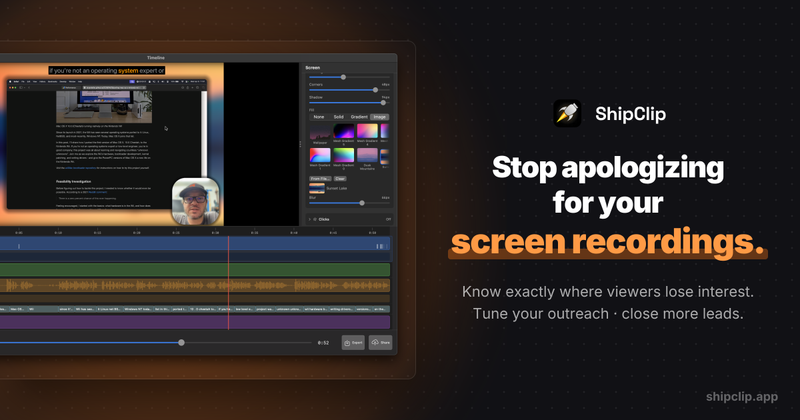
ShipClip is a screen recorder for macOS that records, edits, and shares in one app. Most screen recorders stop at capture. You record, then drag the file into a separate editor, re-export, and upload somewhere else. ShipClip skips all of that. Record your screen with system audio, mic, and camera, edit on a built-in timeline, and share via link. The whole workflow lives in a 5 MB app built in Swift and Metal.
Key features
Multi-track recording: system audio, microphone, and camera record as separate tracks. Fix one without re-recording the others. Timeline editor: cut, trim, and arrange clips on a multi-track timeline without leaving the app. Zoom-to-click: automatically zooms into your mouse clicks during playback, so viewers follow your cursor. Annotations: draw arrows, rectangles, and text directly on the recording. Blur sensitive areas. Volume automation: adjust audio levels per-track with keyframes. Fade music, mute a cough, boost narration. Instant sharing: generate a shareable link or export the file. A 10-minute video exports in under 3 minutes.
How it works
Hit record and ShipClip captures your screen, system audio, mic, and camera simultaneously. Each source lands on its own track. When you stop, the timeline editor opens. Trim the dead air, add zoom effects to your clicks, drop in annotations, and tweak audio levels. Export the final video or share a link directly from the app.
System requirements and limitations
Requires macOS 14.0 or later. Free trial included. The trial lets you record and edit without limits. Exporting and sharing require a paid plan. No Windows or Linux version. No Electron, no web wrapper. This is a native Mac app.
Keywords: screen recorder mac, screen recording software, mac screen capture, screen recorder with editor, screen recorder with timeline, loom alternative mac, screen studio alternative